Harnessing the power of vector search in PostgreSQL with pgvector

Mar 24, 2026
In the age of AI and big data, the ability to find similar items in vast datasets is crucial. Whether you're building a recommendation engine, a semantic search engine, or a fraud detection system, traditional databases often fall short when it comes to handling the complexity of modern data. This is where vector databases come in, and in this post, we'll explore how you can leverage the power of vector search directly within your PostgreSQL database using the pgvector extension.
What are vector databases?
A vector database is a specialized database designed to store, manage, and search high-dimensional data points called vectors or embeddings. These vectors are numerical representations of unstructured data like text, images, or audio, and they capture the semantic meaning of the data. This allows you to find similar items by comparing their vector representations, a task that is difficult to achieve with traditional databases that rely on exact keyword matching.
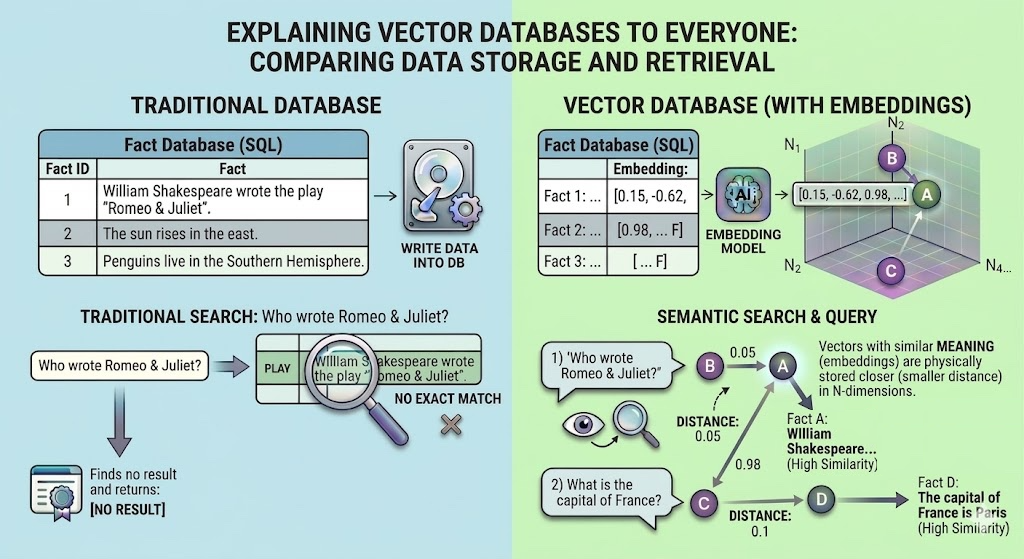
Vector databases are used in a wide range of applications, including:
- Semantic Search: Finding documents or products that are conceptually similar to a user's query, even if they don't share the same keywords.
- Recommendation Engines: Suggesting items to users based on their similarity to items they have previously interacted with.
- Image and Audio Search: Finding images or audio clips that are visually or acoustically similar to a given example.
- Anomaly Detection: Identifying unusual patterns or outliers in a dataset.
Introducing pgvector: vector search for PostgreSQL
pgvector is an open-source extension for PostgreSQL that adds vector similarity search capabilities to your existing relational database. This means you can store and search your vector embeddings alongside your other application data, leveraging the power of PostgreSQL's robust and feature-rich ecosystem.
With pgvector, you can:
- Store vectors in your PostgreSQL tables.
- Perform exact and approximate nearest neighbor searches.
- Use different distance metrics, including L2 distance (Euclidean), inner product, and cosine similarity.
- Combine vector search with traditional SQL queries and filtering.
Getting started with pgvector
There are two main ways to get started with pgvector: using a pre-built Docker image or installing it manually.
Using Docker for a quick start
The easiest way to get up and running with pgvector is to use a Docker image. There are several pre-built images available, such as pgvector/pgvector and ankane/pgvector, which come with PostgreSQL and the pgvector extension already installed.
Here is an example docker-compose.yml file that you can use to start a PostgreSQL container with pgvector:
services:
  db:
    image: pgvector/pgvector:pg16
    ports:
      - "5432:5432"
    environment:
      POSTGRES_DB: vectordb
      POSTGRES_USER: testuser
      POSTGRES_PASSWORD: testpwd
    volumes:
      - ./init.sql:/docker-entrypoint-initdb.d/init.sql
You will also need to create an init.sql file to create the vector extension and the facts_dataset table which we will use to store our facts when the container starts:
CREATE EXTENSION IF NOT EXISTS vector;

CREATE TABLE facts_dataset (
    id SERIAL PRIMARY KEY,
    fact TEXT,
    embedding VECTOR(384)
);
With these two files, you can start the container by running docker-compose up -d
Manual installation
For those who prefer a manual installation, you can install PostgreSQL and then build and install the pgvector extension from source.
Install PostgreSQL: If you don't already have PostgreSQL installed, you can download it from the official website or install it using your operating system's package manager. For example, on Ubuntu, you can install PostgreSQL from the PostgreSQL Apt Repository.
Install pgvector: You can install pgvector from your distribution's packages or compile it from source. For example, on Debian/Ubuntu, you can install it with apt install postgresql-XX-pgvector, where XX is your PostgreSQL version. To compile from source, you can clone the pgvector repository from https://github.com/pgvector/pgvector and follow the installation instructions.
Enable the extension: Once pgvector is installed, connect to your PostgreSQL database and run the following command to enable the extension:
CREATE EXTENSION IF NOT EXISTS vector;

CREATE TABLE facts_dataset (
    id SERIAL PRIMARY KEY,
    fact TEXT,
    embedding VECTOR(384)
);
Working with our dataset
To demonstrate how to use pgvector, we will use a local dataset of 50 facts stored in a file named facts.txt. The file should be in a simple list of facts.
Create a file named facts.txt in the same directory as your script with content like this:
The capital of France is Paris
Mars is also colloquially called the Red Planet
William Shakespeare wrote the play "Romeo & Juliet"
... (and 47 more facts)
Setting up the test project
These instructions assume that uv is already installed. Use the following commands to initialize the project and
install the necessary dependencies:
uv init vectordb
cd vectordb
uv add psycopg2-binary sentence-transformers
Generating embeddings and inserting data
To perform a semantic search, we need to convert our questions into vector embeddings. You can use a pre-trained model from a provider like OpenAI, or an open-source model from a library like Hugging Face. The key is that you are converting the text of the question into a numerical representation.
Here is a Python script that reads from your facts.csv file, generates embeddings for the questions, and inserts the data into the facts_dataset table:
import psycopg2
from langchain_huggingface import HuggingFaceEmbeddings

# Connect to your PostgreSQL database
conn = psycopg2.connect("host=localhost port=5432 dbname=vectordb user=testuser password=testpwd")
cur = conn.cursor()

# Read the facts from the CSV file and insert into the database
with open("facts.txt", "r", encoding="utf-8") as f:
    embeddings = HuggingFaceEmbeddings(model_name="all-MiniLM-L6-v2")
    for fact in f:
        fact = fact.strip()
        embedding = embeddings.embed_query(fact)
        cur.execute(
            "INSERT INTO facts_dataset (fact, embedding) VALUES (%s, %s)",
            (fact, embedding),
        )

# Commit the changes and close the connection
conn.commit()
cur.close()
conn.close()

print("\nSuccessfully loaded facts into the database.")
Let's name this script populate.py and run it with:
uv run populate.py
When running the script for the first time, allow a few minutes for the embedding model to download. Subsequent executions will be significantly faster as the model is cached locally.
Querying for facts
Now that our facts data is in the database, we can ask a new question, find the most similar stored fact, and return its answer. pgvector provides several operators for calculating the distance between vectors:
<->: L2 distance (Euclidean)<#>: Inner product<=>: Cosine distance
Let's find the answer to a new question: "Who wrote Romeo & Juliet?". We'll generate an embedding for this query and use the cosine distance (<=>) to find the most similar fact in our database.
import psycopg2
from langchain_huggingface import HuggingFaceEmbeddings

embeddings = HuggingFaceEmbeddings(model_name="all-MiniLM-L6-v2")
message = "Who wrote Romeo & Juliet?"
embedding = embeddings.embed_query(message)

conn = psycopg2.connect("host=localhost port=5432 dbname=vectordb user=testuser password=testpwd")
cursor = conn.cursor()
query_data = {
    "embedding": str(embedding)
}
cursor.execute(
    "SELECT fact, embedding <=> %(embedding)s AS distance FROM facts_dataset ORDER BY distance LIMIT 3",
    query_data
)
rows = cursor.fetchall()
for row in rows:
    print(row)

cursor.close()
You should get the following output:
('William Shakespeare wrote the play "Romeo & Juliet"', 0.22425718452079202)
('The capital of France is Paris', 0.8331506600037014)
('Mars is also colloquially called the Red Planet', 1.0083558881047898)
As shown, the top result identifies William Shakespeare as the author of Romeo & Juliet. This hit is significantly
closer in distance than the other facts (0.22 vs. 0.83 and 1.0). In a production environment, you should implement
a similarity threshold (e.g., <0.5). This ensures that if no relevant data is found, the application refrains from
providing an incorrect or 'hallucinated' answer.
Choosing the right search algorithm: A deep dive into distance metrics
When you search for the "closest" or "most similar" vectors, you're asking the database to measure the distance between them. But "distance" can mean different things. pgvector offers three primary ways to measure it, and choosing the right one is critical for the success of your search application. In the previous example, we have chosen to use cosine similarity search for reasons which should be obvious below.
Let's break them down with intuitive explanations and clear examples.
L2 distance (Euclidean)
- The Core Concept: Imagine two points on a map. The L2 distance is the length of the straight line you could draw between them. It’s the "as the crow flies" distance, generalized to any number of dimensions.
- What It Measures: It calculates the square root of the sum of the squared differences between the corresponding elements of two vectors. It answers the question: "How far apart are these two points in space?"
- What It's Sensitive To: It is sensitive to both magnitude (length) and direction. If two vectors point in a similar direction but one is much longer than the other, the L2 distance between them will be large.
- pgvector Operator:
<-> - Range: 0 to infinity, where 0 means the vectors are identical.
Use L2 distance when the magnitude of your vector has a clear and important meaning. For example: Imagine you are representing images with a simple vector of their average red, green, and blue values: [R, G, B]. A bright red image might be [250, 10, 20]. A dark red image might be [50, 2, 4]. These vectors point in a similar direction (they are both reddish), but their magnitudes are very different. L2 distance correctly identifies them as being far apart because "bright red" is visually very different from "dark red." The magnitude, representing brightness/intensity, is crucial.
Cosine similarity
- The Core Concept: Forget about length. Cosine similarity only cares about the angle between two vectors. Imagine two arrows starting from the same point. Are they pointing in the same direction, opposite directions, or somewhere in between?
- What It Measures: It measures the cosine of the angle between two vectors. It answers the question: "Are these two vectors pointing in the same general direction?", values range from -1 (perfectly opposite) to 1 (perfectly identical). A value of 0 means they are orthogonal (90 degrees apart). This is the metric you'll almost always want to use for semantic search.
- What It's Sensitive To: It is sensitive only to direction. It is completely insensitive to the magnitude of the vectors.
- pgvector Operator:
<=> - Range (for the operator): pgvector uses a distance metric (<=> operator) which is calculated as 1 - Cosine Similarity. This converts the similarity score into a distance where 0 means identical and 2 means perfectly opposite.
Use cosine distance when the direction of the vector is what encodes the meaning, which is almost always the case for semantic text search with modern language models (like those from OpenAI or Hugging Face). The example described earlier in this post is a good example of when to use cosine similarity. When language models create embeddings for text, they place concepts in a high-dimensional space.
- The sentence "What is the capital of France?" might get a vector.
- The sentence "Which city is the French capital?" will get a different vector, but it will point in almost the exact same direction because the semantic meaning is identical.
- A sentence like "I love Paris in the springtime" might point in a related but different direction.
- A sentence like "What is the best way to cook pasta?" will point in a completely different direction.
Cosine distance is perfect here because it only cares about the conceptual direction (the meaning), not the arbitrary length of the vector produced by the model. And this is why we can ask pgvector "Who wrote Romeo & Juliet" and our example is able to tell us the answer is William Shakespeare.
Inner product
- The Core Concept: The inner product is a bit more complex. It is the projection of one vector onto another, scaled by the other vector's length. It is influenced by both the angle between the vectors and their magnitudes.
- What It Measures: It calculates the sum of the products of the corresponding elements of two vectors:
A · B = Σ(Aᵢ * Bᵢ). - What It's Sensitive To: It is sensitive to both magnitude and direction. Unlike L2, it doesn't measure a "distance" but rather a "projection." A large positive value means the vectors are pointing in a similar direction and have large magnitudes.
- pgvector Operator:
<#> - Range (for the operator): Negative infinity to positive infinity.
Use inner product when you care about both direction and magnitude, but in a multiplicative way. It is often used in recommendation systems and when working with embeddings that have been specifically trained for inner product search.
Imagine you have user embeddings and item embeddings trained together. The model is trained so that the inner product of a user and an item they are likely to enjoy is high.
- A user who loves sci-fi movies might have a vector that points in the "sci-fi" direction.
- A popular sci-fi blockbuster will have a vector that also points in that direction but has a large magnitude (representing its popularity or strong "sci-fi-ness").
- A niche indie sci-fi film will point in the same direction but have a small magnitude.
- The inner product will recommend the blockbuster more strongly because the product of the magnitudes will be larger, which is often the desired behavior (recommend popular and relevant items).